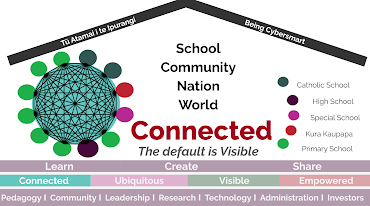
Saturday, September 18, 2021

Day 8 Computational Thinking


Day 8 

Computational Thinking

Empowerment

Today's discussion about the perception of the word Agency highlighted how differently the digital journey is for learners and their whanau, as does statistics such as 36 million less words, age 3 v age 6, 1/3.

Manaiakalani is not about providing another learning tool, but to "transform the way we learn, offer new experiences and opportunities" Dean Shareski 2011.

The greatest joy comes from EMPOWERING students to value themselves, their ideas and their learning.


 A priority for me in the classroom is to identify and reflect on how many conversational exchanges I have with my learners that exceed the 5+ a day challenge.  I feel there are several learners I achieve this with easily, and two or three I may not be giving this opportunity.  This also connects to the Opportunities to Respond in a learning context best practice I have been considering as part of my teaching reflection.


Future of Technology

Where is tech taking us?  Where do we want it to take us?  How do we prepare ourselves and our learners for what is coming? Exciting yet daunting questions!  


Digital Technology Curriculum

Having a look at how the Digital Curriculum links with the Technology curriculum, and the examples of Designing and Developing Digital Outcomes was reassuring.  

This presentation is a valuable resource for me as I need to seriously upskill my understanding of the curriculum and how I can facilitate this learning.  I an intending on revisiting this often over the next few months!


Google exam
Hints
Smart chips:
Type @, this will show a pop up menu with what you can attach.
Google Classroom:
I have access so will have a 'play' and create a classroom banner and practice how to set/find Google Meets.
How to send blog reflections to facilitators:
Select DFI from label list/word cloud, copy omnibox from search and email as link to Maria/Vicki.

Minecraft Block Coding/Scratch Block Coding

This was a great opportunity to step into my learners shoes!  I thoroughly enjoyed using both programmes and learning within the tutorials.  I also experienced the utter frustration of not being able to debug my code and make my Pong Ball game run successfully.  If this is how my learners can feel I need to ensure I can be of assistance to them in that moment of 'arrggghh!'  Further experience and building a bank of tutorials for both myself and my learners is my next step in this realm!


Saturday, September 11, 2021

Day 7 Devices

Day 7 

Devices 

Ubiquitous


Ubiquitous is about empowering our learners by connecting them to their learning on their terms.
Rewindable learning is one of the tools to ensure learning is available to the power of A4.  
Learner created rewindable learning (DLO's) are a great resource to include.  By offering ubiquitous learning you are remedying many of the frustrations teachers have - missed learning experiences, relief cover, increasing learner agency.  
The move to At Home Learning has highlighted the value of digital learning.  The routines and processes needed were already in place for learners, with easy access and rewindable learning available on our class site.  While this benefited my practice, I did find I relied on written feedback too heavily, which was time consuming and not ideal for some of the learners I work with.  Discovering Mote definitely helped, but this is an area I need to look into more and refine as this will help both my At Home learning and classroom programme.  I am also considering how to incorporate and encourage learners' rewindable learning as a resource for the class.
I have also collected my learners' opinions of At Home Learning and will unpack their perspective to inform my next steps.  The initial information from them shows the majority of them enjoyed the freedom and agency of choosing the what and the when of their learning, and appreciated the small group Meets where they felt more connected to their learning and each other.  This highlighted to me the importance of individual and small group teaching and learning in a learner-led manner whilst in the classroom as well as online.
'If it is worth learning it is worth capturing.  If it is worth teaching, it is worth capturing.'


Cybersmart


As the Cybersmart curriculum is foundational to the Manaiakalani pedagogy, it was useful to see the overview of the Cybersmart curriculum and the variety of resources available.  I have yet to be involved in a Toki class for a full year, so am looking forward to facilitating the three learning areas and seeing how the learning progresses and develops throughout the year when embedded in our class curriculum.  My key takeaways were this programme is positively framed - it is to EMPOWER our learners and is focused in what you CAN do.

While my experience with this learning is limited, I do wonder how we can encourage our learners to transfer their 'Cybersmarts' to other contexts - such as more private platforms like social media. 


Manaiakalani 1:1 Journey


Tiriti o Waitangi principles of:

Partnership - Ako, Whānau experience and collaboration

Participation - Every learner, every teacher can be supported to be digitally fluent

Protection - Cybersmart, Hāpara, N4L & Linewize filtering

Digital Dig - Complete at the beginning of every year at every level.


Explain Everything 

This was an interesting application to explore.  The teacher made examples highlighted what a great resource this is in any classroom.


Hāpara Workspace

Creating a Hāpara workspace was a first for me.  I can see the benefit of utilising this with my senior learners, and found several useful learning tasks via the discover function.  I was happy to learn workspaces can be embedded on your learning site, as I am currently trying to ensure all learning experiences are within/accessed by our learning site, rather than my initial 'scatter gun' approach (pushing some through Hāpara to folders, some on site etc).  


Blogger Tips
Add Link List gadget to both my blog and our classes to include our Learning Site.


Saturday, September 4, 2021

Day 6 Enabling Access

 Day 6  Enabling Access


WWW

Mote - a voice recording extension that is useful in providing both instructions and feedback to learners.  I have added this extension and will look at it in more detail (and how to embed in sites - using Maria’s blog post).


Connected

Manaiakalani is connected by design and allows for many connections, (with people -cluster, school, and learning -PDL, Toolkits, DFI) through many channels.
RSS and Tuhi mai Tuhi Atu - Look into connections here - MKA Twitter.

Leading Learning Using Google Sites

We all have this digital affordance, but teaching practice is still at the core of accelerating learner progress.


Visible Teaching consists of:
The role of the teacher
Nature of assigned tasks - SAMR
Nature of sites accessed - Rich multimodal opportunities
Learner choice and collaboration - Agency

Five affordances causing accelerated shift:
Engagement
Teaching Conversations
Cognitive Challenge
Scaffolding - rewindable learning and learning opportunities


The 'one stop shop' of a class site is well embedded in the learners I teach, having been part of the Manaiakalani programme for 4 years.  While it changes for them each year depending on their teachers understanding, they are literate with the core functions of a learning site, and the Learn Create Share pedagogy., and they benefit from the consistency of this approach.
While creating and maintaining a learning site can be time consuming it has definitely been paying dividends in my organisation and teaching, more now that ever with the move to At Home Learning. Including a parent portal is my next step with my site, to encourage the communication triangle of school, home, learner and including learning progressions for mathematics and literacy on the site (for both learners and their whanau).

TIP:
When viewing a presented Google slide, deleting everything after 'present' in the omnibox allows you to view in edit mode.

Considerations for a site:
Presentation - Colour palette
Access - No more than 3 clicks
Creative commons - Check Copyright, all imports from Explore tool automatically populates credits

Making buttons on slides - 300 x 300 pixels a good size, download as a PNG.


Critiquing websites and receiving feedback on your own site was a useful task - and I found several ideas/models to bring to my own site that will benefit both myself and my learners.
My feedback received:

Does the site engage the viewer?

Does the site function smoothly for the user?

Does this site reflect visible teaching and learning?

Does this site include multimodal learning opportunities?

What other feedback would you give to the creator of this site?


4

3

3

4

4

4

4

4

5

4

4

4

4

4

4

4


My goals from this feedback:


Visibility

Functionality

1.Move some info using buttons - too much on pages - export to other pages 


2. Visible learning - include T shaped literacy sites I have used and

Learning progressions - To do


3. Home button to return to schl site/parent page for communication/updates

Include learner photos.

Notes:

Changes - export some information to new pages

leaving button to access - too much scrolling!

Rework Math page - clunky

Recorded Google Meets - add folder with access restrictions - only St Pats to access

Rewindable learning - when using Meets footage do the same - no public access


Before:


After:


Included learner photos instead of waiting for class photo to include.

Sunday, August 29, 2021

Day 5 Collaborative Sites

 Day 5 Collaborative Sites

Our WWW discussion was a valuable start to the day, leaving me with a question to reflect on with my learners in mind - Do I offer enough time to process? 


Visible

Today's focus was the Visibility of the learning and teaching journey. This is integral to the Manaiakalani structure.


Visible - Can we see it? 

'It' being teaching and learning, Is 'it' visible to:

Learners

Whanau

The teacher

Colleagues


So what needs to be visible to all parties? Planning (TEACHER FUNCTIONS), process (HOW WE LEARN), outcomes (WALTS), assessment (FORMATIVE,SUMMATIVE).


For too long success in learning was only accessible to learners that were able to ‘read the teachers mind’ - making the learning fully visible allows this success for all learners.


Visible = no surprises!


The digital space allows for learning to be:

Accessible - no barriers - no need for photocopies!

Available - learning is present/there/ready to go/real time!

Advance - before it is needed - collated and accessible at the learners pace.


While the learning site provides visibility for learners and Hapara provides visibility for teachers,

Blogger provides visibility for many!


From the learners' perspective the MKA platforms allow and encourage valuable, authentic feedback in real-time.


I have already mentioned that I must look at the Class on Air website! I must make time to view a truly visible learning and teaching experience.


The digital space has an array of Multi modal tools to engage, but can also erect barriers - ie passwords, complex content, ill-designed contexts.


Multi modal site design:

Priority goals

Engagement

Personalised learning

Accelerated achievement

Empowerment


I liked the analogy that your class site home page is your ‘shop window’ - does it engage? Is it exciting? While I like our page this has reminded me to ask for my learners voice - does it work for them? Do they find it engaging?


Considerations I need to consider:

Learners variability - How well do I know my learners, what do they need?

UDL principles, are these truly embedded in my practice? 

Representation - How is learning content presented?

Action or Expression - How well do I offer agency in the SHARE component?         


T Shaped Literacy


Learning through complex texts

Different perspectives and points of view

Discern levels of credibility and reliability

Multi texts through multiple modes (different ‘types’ of texts ie written, audio, visual, symbolic etc)

Encourages critical thinking 

While I have included T Shaped Literacy learning opportunities in my class programme I am very much a beginner facilitating this learning. I have used the Text database in the past, and also gleaned other resources from some training material a colleague shared.

The discussion and information on the differing texts you offer, (Complementary, scaffolding, learner selected) and their purpose was very useful!

This is an area I would love more PD in, and need to offer more in my classroom. I am attracted to the deeper thinking, and opportunities for learner discussion, it offers, as well at the agency it encourages.


My T shaped Literacy Website (Still under design!)


Thursday, August 19, 2021

Day 4 Dealing with Data

 Day 4 Dealing with Data

SHARE - Tohatoha


"Work with learners to establish an authentic audience for their learning outcomes'

Today's session highlighted the benefit of both sharing learning and how this needs to be done in a way that is authentic to our learners to engage them in both their learning and how they interact/reflect on their learning process.

The digital platform has amplified and accelerated the sharing capabilities of our learners, allowing our learners to share with purpose to a broader audience - an authentic audience that chooses to interact with their learning.

Having a real purpose and an authentic audience can encourage task completion, the motivation of receiving comments/feedback/feedforward, sharing end products/DLO's, and their reflections on their learning can be a useful driving force in the classroom.

This is a timely reminder for me not to 'rush through' the Share aspect of the Learn Create Share pedagogy!  


I always wondered why Blogger was the chosen platform for Learn Create Share, so having the benefits of Blogger explained was also useful to my understanding.

Class on Air - This looks like a great resource for PLD, and I am looking forward to investigating this further.

I am also going to ensure I explore the 'Analyse your audience' tools in blogger, and feel this will be useful in my class to 're-ignite' learners interest in blogging.


👌Digital Citizenship                 👌Lateral Learning Networks                  👌Accelerating Achievement      👌Whānau connections           👌Threaded conversations/two way/real
👌Record of Learning/digital portfolio                                
Forms

Having always used programmes like Survey Monkey it was really beneficial to see how Forms can be used for data gathering, but also as a learning and testing tool.   Tips and tricks to take away include: lock mode, quiz setting, exporting data directly to sheets, creating pathways, using as a shortcut to marking!
Maps
I have not used Maps in the classroom often - the few times I have the learners tended to change to street view and stalked each others houses!  What a great learning and teaching tool!  The different learning contexts and content that Maps can bring to learning experiences was a real surprise to me!  Other takeaways for me included importing data, layering, the differing learning experiences - from checking Google's accuracy to studying terrain and measurement tasks.


Sheets
I explored my son's blogging activity and displayed this using Google Sheets and Google Draw.  I have always found Google Sheets quite frustrating and finicky so this session was one I was both looking forward to and wanting to avoid!  I do now feel more confident with Sheets, and am glad of the tutorials/resources included.
Tips and tricks - Autofill, Filter options, conditional formatting, explore tool will suggest charts/analysis.  
Using a breakdown such as this as a learning experience has many benefits!  Love the learning and goal setting Mele demonstrated in her presentation.  Checking out Robyn's blog for more information and a lesson plan on this is on my to do list.
Blogger Tip
To create a link to another blog post use the below code with omnibox address of post

<a href="insert URL here">Insert display text here</a>


Friday, August 13, 2021

Day 3 Media

Day 3

Media 

Creativity 

The power of 'Create' to engage, empower and encourage critical thinking and collaboration is such a natural process. I found myself reflecting on learning I had witnessed this week with my learners.  This was in no way planned but resulted in my own child dropping his Ipod through the gaps in the decking outside my classroom while I was at a meeting.  I happened to mention this the next day to my learners, which created a flurry of discussion on how we could get it back.  A team of learners then spent their breaks coming up with a plan and trialing their ideas.  Learning from the failed attempts lead them to collaboratively create a tool, and working together they extracted the Ipod.  They were so engaged and invested in solving this problem and creating a solution.   Taking the natural curiosity and creativity I witnessed, and adding the limitlessness of creating in the digital space is an exciting prospect.   

While I have a foundational understanding of the Learn Create Share pedagogy, and am working on embedding this in my practice, I must prioritise my own learning in this area, to ensure I am not a barrier to the opportunities for success it affords our learners.


YouTube

I have already been using YouTube to share learning content with learners in the classroom, having completed a Digital Toolkit at the beginning of the year, today's content was a timely reminder of why we use YouTube - to create learning content for our learners. It was also helpful to pick up a few tips like being able to make changes to other peoples playlists by making a copy to allow changes, being able to embed directly to Blogger and removing recommended videos with a URL edit (?rel=0).

Media - SISOMO

Sight, sound and motion - a fantastic way to engage and communicate!  The Moviemaker packs are an idea I will investigate further, having previously felt the expense put this type of equipment out of reach.  Use landscape!

I am looking forward to exploring tools, such as Wevideo alongside my learners, I feel this is an area in which we will embrace ako!  I will be looking at the Wevideo Academy tutorials over the next few weeks as this is a tool I have yet to explore.

Drawing

How have I never discovered the mask image crop tool?  This session provided some great time savers as well:

PNG files - rather than search for 'transparent'

Polyline tool - double click to disengage

I attempted a Google Draw polyline self portrait (still a work in progress) and am looking forward to introducing this method to my learners next week as it fits in brilliantly with the visual arts learning we are currently undertaking. 

Slides 

Pick a Path Slides

Considering how creating in this manner links with A/O's in the Digital Curriculum was really beneficial to me. Testing/debugging/computational thinking - has reminded me to use digital language across all areas of the curriculum.

Control + D to duplicate - why have I been Control + C, Control + V all these years?!

Thursday, August 5, 2021

Day 2 Workflow


Day 2

Workflow

Using Google Meets as a Create tool was an interesting experience today.  I can see great this being an enjoyable and useful way that learners can share and critique their presentation and communication skills, while creating a rewindable learning tool. 

 Day 2 - Workflow

Today content has provided me with timesavers!  It has also given me tools to streamline my practice - such as RSVP'g a calendar invite from the email invite (how did I not know this??) and organising my tabs with Toby Mini, or just pinning, to save that valuable time in front of my class, when learners are engaged and ready, only for me to lose them while frantically searching for the elusive tab I desperately need to open.

Manaiakalani Pedagogy - Learn Create Share - 

Recognise effective practices

Amplify effective practices

Turbo-charge to take it to the next level

Effective Practice - What is it? Identify it, amplify it and turbo charge it!

I found this presentation very informative and motivating - I feel like, although I am at the beginning of my digital journey, I am definitely on the right track with my thinking.  The value and opportunities digital tech can afford us and our learners is exciting.  

How does learning look in my school? PB4L, Catholic character, Values, learning in faith, T shaped literacy, Learn Create Share.

                                                                    Slide with Resources

Google Meets

I picked up a couple of shortcuts and tips here - Chrome tab for best quality video sharing, share tab v screen.  Utilising this as a Create tool was something I had not considered - This could translate to the classroom so well, within many curriculum areas.

Google Calendar

While I use Google Calendar daily I have not yet explored this.  Today I have learnt many small (but mighty!) time savers and short cuts.  The use of the Appointments function could prove useful.  I was not aware of the note function when RSVP'g - having sent accompanying emails in the past.

Google Keep

I have added this extension and downloaded the phone app.  I am looking forward to investigating this further and can see how this will be beneficial in both professional and personal life.  I am an avid note taker, so the text grab function has got me hooked already!

Tab taming

I needed this session.  I am looking forward to creating folders and temporary grouping to streamline my presenting, both in class and in meetings.  I am still exploring the Toby Mini extension and look forward to trialing this.